iOS 17.5 Introduces Innovative ‘Repair State’ Feature for Enhanced Security During Service

Apple’s latest software update, iOS 17.5, is setting a new standard for mobile device management and security with its introduction of the ‘Repair State’ feature. This addition is a significant enhancement for iPhone users, particularly concerning how devices are handled during service and repairs.

Current Repair Process and Challenges

Traditionally, sending an iPhone to Apple for repair necessitated turning off ‘Find My’ and disabling Activation Lock. This requirement was to ensure that the device was not stolen and that Apple technicians could access the device. However, it posed a security risk: once ‘Find My’ was disabled, the device could no longer be tracked or protected from theft, leaving it vulnerable during transit and repair.

Details of the ‘Repair State’ Feature

With iOS 17.5, the ‘Repair State’ feature allows iPhones to be sent for repairs without deactivating ‘Find My’ or Activation Lock. This means that the device remains trackable and secure, with Activation Lock still in place to prevent unauthorized use. When set to ‘Repair State,’ the device shows a “Ready for Repair” label and features a small stethoscope icon in the list of devices on Find My.

Key functionalities while in ‘Repair State’:

  • The device remains fully functional.
  • It can be tracked via the Find My app.
  • It retains Activation Lock, enhancing security.

How to Enable ‘Repair State’
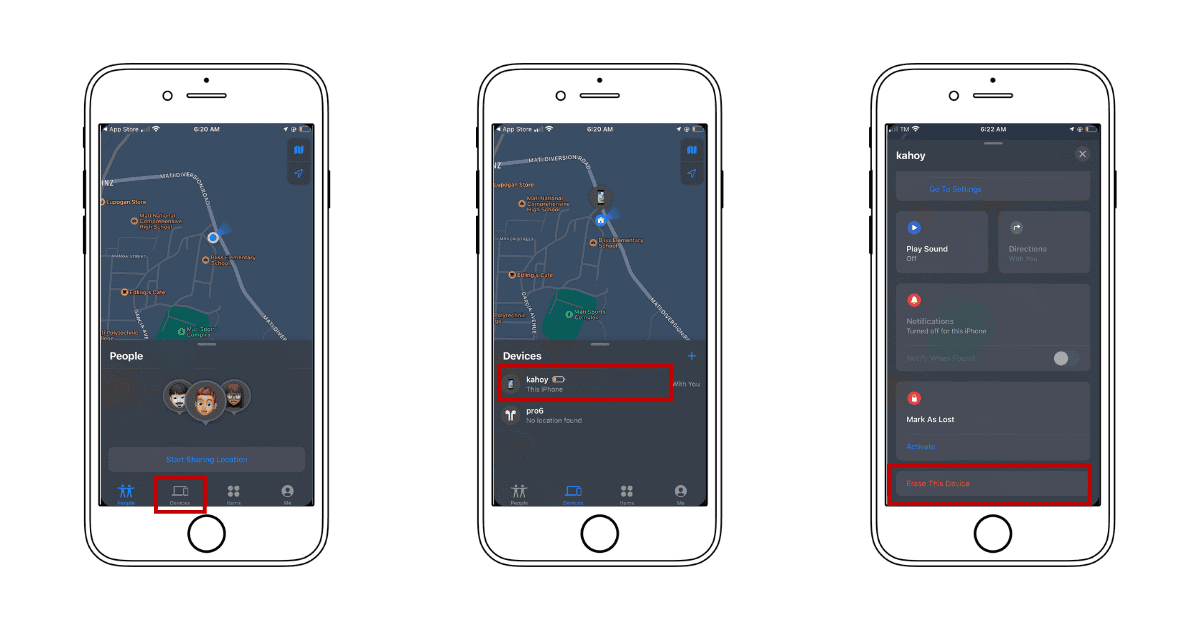
Activating the ‘Repair State’ is a straightforward process that ensures your iPhone remains protected even when sent for repairs. Here’s how you can enable this feature:

  1. Open the Find My app: Start by opening the Find My app on your iPhone.
  2. Access your devices list: Tap on the “Devices” tab to see a list of your Apple devices that are linked to your Apple ID.
  3. Select your device: Choose the iPhone that you are sending in for repair.
  4. Choose ‘Remove This Device’: Tap on “Remove This Device.” For iPhones with iOS 17.5, this will trigger the option to enable ‘Repair State’.
  5. Confirm to enable ‘Repair State’: Follow the prompts to confirm that you want to place your device in ‘Repair State’.
  6. Device readiness: Once enabled, your device will display a “Ready for Repair” label in the Find My app, indicating that it is in ‘Repair State’ but still protected by Activation Lock.

Implementation and Device Compatibility

Currently, this feature is available only on the iPhone. If attempted on other devices like an iPad or Mac, the standard removal process initiates, which could deregister the device from the user’s Apple ID.

Potential Impact on Consumers and Service Processes

The ‘Repair State’ feature is a game-changer for iPhone users, offering peace of mind that their devices are secure throughout the repair process. It potentially revolutionizes Apple’s service protocols, making device management more secure and user-friendly.

Security and Privacy Considerations

By keeping ‘Find My’ and Activation Lock active, ‘Repair State’ ensures that iPhones are always under the user’s control, significantly reducing the risk of theft or loss. This feature reflects Apple’s ongoing commitment to security and customer privacy, critical components of the company’s brand promise.

MacReview Verdict

The introduction of ‘Repair State’ in iOS 17.5 is a major step forward in how Apple addresses the security concerns associated with device repairs. This feature not only protects the device but also maintains user trust in Apple’s repair process. As the tech community anticipates its rollout, many are hopeful that this feature will soon extend to other Apple devices, further enhancing the ecosystem’s integrity.


This is a recurring post, regularly updated with new information and offers.

The MacReview YouTube Channel

The MacReview YouTube Channel

Visit Our
Youtube Channel

Watch Anywhere, Anytime!

Three iPhones on a dark background with pink lighting showing the ChatGPT and Apple Music connection flow, including an "Apple Music" app page with a Connect button, a "Connect Apple Music" permissions dialog, and a ChatGPT chat generating a holiday song playlist.
Apple Music now works as a ChatGPT extension, so you can search tracks and build playlists using plain language. Here is how to set it up and use it.
iPhone Duo, Apple's first foldable iPhone, shown partially opened to reveal its inner display
Apple's Surprise and Shine event brought a foldable iPhone, two Pro phones, two watches, new AirPods, and a rebuilt Health app. Every product, price, and ship date in one place.
Reward your inbox with the TPG Daily newsletter img

Subscribe to Our Newsletter

REWARD YOUR INBOX WITH THE MACREVIEW NEWSLETTER

Microsoft 365 wordmark surrounded by glossy app icons for Word, Excel, PowerPoint, Outlook, OneNote, Exchange, and Microsoft 365 on a soft light background.

Microsoft 365 experienced a significant service disruption affecting business and enterprise customers across North America. The outage impacted core productivity services including Outlook email, Microsoft Defender, and administrative portals, leaving users unable to access critical business tools for several hours. […]

Wireless printer with WiFi signal icon representing Apple AirPrint enterprise printing

When Apple introduced AirPrint in 2010, enterprise IT administrators largely dismissed it as a consumer-focused feature. More than a decade later, AirPrint has fundamentally transformed how organizations handle printing infrastructure, forcing the entire industry to abandon complex driver management in […]

Password Utility Solves the FileVault Reboot Problem for Remote Mac Management

Managing remote Macs presents unique challenges, particularly when FileVault encryption creates accessibility issues during restarts. A new utility from Twocanoes Software addresses this long-standing problem for IT administrators who need reliable access to devices deployed across distributed locations. The FileVault […]

iPhone and AirPods on a black and white background

Introduction A recent rumor from China suggests that Apple is set to continue with the color-infused back glass technology in the upcoming iPhone 16, mirroring the aesthetic introduced in the standard iPhone 15 models. This development indicates a consolidation of […]

Man working on a laptop in a modern office at night with “Creator Studio” text and Apple logo above, plus floating creative app icons in the foreground.

Apple is reportedly planning to expand its subscription bundle offerings and introduce more paid features across its software ecosystem, following the launch of Apple Creator Studio last month. The company appears to be evaluating opportunities to monetize additional areas of […]

Three iPhones on a dark background with pink lighting showing the ChatGPT and Apple Music connection flow, including an "Apple Music" app page with a Connect button, a "Connect Apple Music" permissions dialog, and a ChatGPT chat generating a holiday song playlist.
Apple Music now works as a ChatGPT extension, so you can search tracks and build playlists using plain language. Here is how to set it up and use it.
Laptop on a dark desk displaying the Opera One browser start page with color-coded Tab Islands in the tab bar, a search field, and shortcut tiles over a purple and orange wave wallpaper.

,

Opera has released Opera One R3, a significant update to its flagship browser that introduces customizable Tab Islands, an enhanced AI assistant with YouTube comprehension capabilities, and dynamic themes with dedicated soundscapes. The update represents Opera’s continued effort to differentiate […]

Apple Arcade games available across Apple devices

In 2025, you’ll notice significant changes in Apple Arcade’s fan favorites, as exclusive updates aim to refine and enhance your gaming experience. Titles like WHAT THE CAR? and Hello Kitty Island Adventure are set to receive major gameplay improvements, alongside […]

Resident Evil 2 on iPhone, iPad and Mac

With the anticipated release of Resident Evil 2 on iOS and macOS, set for December 10, 2024, fans of the franchise are on the edge of their seats. This iconic survival horror game promises a refreshed experience tailored for mobile […]

Microsoft 365 wordmark surrounded by glossy app icons for Word, Excel, PowerPoint, Outlook, OneNote, Exchange, and Microsoft 365 on a soft light background.

Microsoft 365 experienced a significant service disruption affecting business and enterprise customers across North America. The outage impacted core productivity services including Outlook email, Microsoft Defender, and administrative portals, leaving users unable to access critical business tools for several hours. […]

A smartphone on a wooden desk displaying the Peaks App interface with holographic data overlays showing heart rate graphs, sleep quality, and energy levels next to a cup of coffee and a yoga mat.

Apple Watch users generate extensive health data through the Apple Health app, but translating that information into practical guidance remains challenging. A new app called Peaks aims to bridge that gap by analyzing sleep patterns to help users manage their […]

Sign Up For Newsletter mobile

Catch The Latest

Sign Up For Newsletter

Apple has confirmed plans to begin manufacturing the Mac mini in the United States later

Apple Music is currently offering a compelling promotion that allows new subscribers to enjoy three

Been FaceTiming with my younger daughter Jordyn recently and were messing around with this new

Samsung has swiftly capitalized on the backlash from Apple’s controversial “Crush!” ad for the M4

Scroll to Top